Protected case study
Enter the password given in the resume
Building AI Data Mapper for supply chain integration application

About casestudy:
Data mapper is one of the key features of integration application Zynque. The case study is about how we arrived to the existing design. The decisions and the reason behind it.
Build it, and then Fix it. That's fundamentally how most of the application is build initially.
Context
Zynque is supply chain integration application (2 Year old). The company I work in has lot of integration request. On arrival of AI our CEO thought why not buils a SAAS around it
As a result, he vibe coded it. It worked. But it was giant mess of technical debt and design debt. And that is where I come in to fix the experience on the design front.
My Role
I am the only UX designer who has to build new UX and improve user experience based on the feedback
Let's get the story going
My Product manager who pretty much manages most of the product say " it is time to fix Data Mapper"
I asked that if it is functional? what are we trying to fix it? What is the scope?
Problem
Data mapper is an important node in workflow designer a canvas-based flow creator. example: Say updating data from Returns management tool to order management tool. The promblem is that It just doesn't work as intended to.
The UI based mapping almost doesn't exist
There were lot of function missing
The user were using code instead of data mapper
Goal
Make Data mapper usable and easy to use. Make sure users prefer data mapper over writing code at these point the idea AI data mapping doesn't exist
Challenges
There were no good data mapper examples to take inspiration.
To make data shown clearly within available viewport
The users were skeptically if data mapper would be any use making hard to get input
First version: (yup! It took revision to get it, right)
I approached the design as two phases from the beginning. The challenge was nobody I worked with had clear direction. I decided to creation a version which is functionally first. Then revise to the version which ideal for user.
I asked that if it is functional? what are we trying to fix it? What is the scope?
Problem
Data mapper is an important node in workflow designer a canvas-based flow creator. example: Say updating data from Returns management tool to order management tool. The promblem is that It just doesn't work as intended to.
The UI based mapping almost doesn't exist
There were lot of function missing
The user were using code instead of data mapper
Goal
Make Data mapper usable and easy to use. Make sure users prefer data mapper over writing code at these point the idea AI data mapping doesn't exist
Challenges
There were no good data mapper examples to take inspiration.
To make data shown clearly within available viewport
The users were skeptically if data mapper would be any use making hard to get input
The First Version and Feedbacks
After escaping the skeptism of developer and getting enought input to built the data mapper. The biggest challenge was on how to handle the data that is in objects(JSON). The drill down mechanism. After back and forth and lot of convincing of stakeholder decided to show all data without any highrarchy at initial stage and improve on feedback and user data.
The final design which was shipped in first draft was a node which can be clicked and a full screen modal appears and three tabs
Tab 1: Two input field for adding input source and destination source
Tab 2: Three colum: Source, destination and mapped data. This is where the data is mapped
Tab 3: Test data. Which nobody cared. So kept as simple as possible


Results
We meet the goal the user who are typically developers started using the data mapper 90% of time when the map data which was good news. We achieved functional data mapper
Pain points found
In the mapped data column, the difficulty in reading the data name, especially when mapping two longer data like. Level1.datalevel2.level3.finallevel. It required hover or horizontal scroll which is not ideal
Second version. AI and we fixed it all
PM said it is time to fix all the pain points and also implement new feature AI mapping.
AI engineer was there, his job was to experiment and figure features which can be implemented using AI. This case AI data mapping. So now my job was to figure it out how implement it. Also, while addressing the pain points of first version.
Goal
Implement a node called AI mapper
Fix pain points of the data mapper from previous version. Solving AI mapper node as data mapper node as well
Challenges
Simplify AI mapping without adding complexity, AI mapper is more of productivity boost then alternate to manual mapping which requires manual intervention after mapping.
Yup! We fixed it all and it got AI productivity boost too
We fixed the user experience issue pointed out in previous version by adding
Mapped data are shown as rows rather than in column
Added full screen mode for the mapped data column
Added ability to hidden common prefix
Furthermore, added a toggle feature which pops out the mapped data column more like Gmail compose mail experience. It can be popped out and in, minimized, maximized.
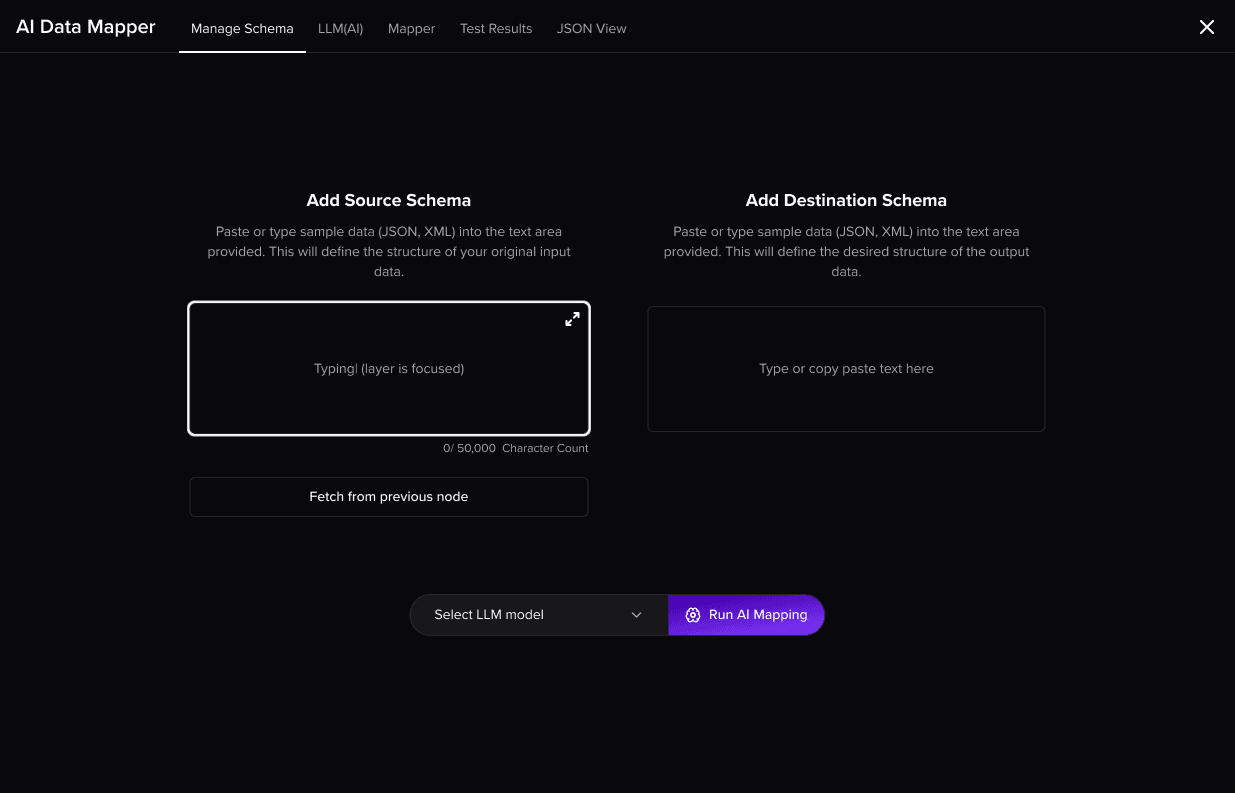
Simplified AI experience. Rather than making huge change I decided to just add a tab in between 1st and 2nd. Initially it was adding data source then add start mapping. Now
Tab 1: Add source and destination schema. And click start mapping
Tab 2: Review, approve or reject mapped data
Tab 3: Manual data mapper with premapped data from AI mapping
Tab 4: Test data.


Results
We saw huge productivity boost. While AI data mapping doesn't always produce desired result, the combined workflow of manual mapping helped significant levels of AI data mapper.
100 % adoption of data mapper
9/10 people said that they saw huge productivevity boost after AI mapping availablity